Home › Free Resources › Learning Center › How to manage a construction submittal log
Manage WorkHow to manage a construction submittal log
A submittal log should help prevent surprises in the field, not just record paperwork. Here is a simple method for organizing submissions, approvals, resubmissions and procurement dates.
What is a construction submittal log?
A submittal log is a tracking register for shop drawings, product data, samples, mockups and other items requiring review or record. Its purpose is not only to list documents; it helps the team see what must be submitted, who has it, and whether the current approved material can be procured or installed.
Start with the specifications, not a blank spreadsheet
Review the project specifications, submittal schedule, procurement requirements and contract routing. Identify each required submittal by specification section, package, responsible subcontractor and related long-lead purchase. Separate action submittals from informational submittals where required.
Fields your log should contain
Track submittal ID, revision, specification section, description, responsible contractor, required-on-site date, planned submission date, actual submission date, reviewer, review due date, current status, return date, resubmission due date and linked procurement milestone. Include a link or reference to the actual file and reviewer response rather than treating a status cell as evidence of approval.
Build the schedule backward
Example: equipment needs to arrive June 15. Assume six weeks for fabrication, one week for purchasing after approval and two weeks for review. Under these assumptions, approval is needed by approximately April 27 and the submittal must go out around April 13. Add time for internal checks, possible resubmissions, shipping and holidays. Use actual vendor lead times and contract review periods rather than assuming the example applies to every job.
Use precise review statuses
Useful stages include Not Started, Preparing, Submitted, Under Review, Revise & Resubmit, Approved as Noted, Approved, Rejected and For Record. A return marked “Revise & Resubmit” is not the same as an approved item. Preserve the review comments and identify which revision controls installation.
A simple weekly routine
At the beginning of the week, filter for reviews overdue, items due to submit in the next 14 days, revisions waiting on a subcontractor, and approved items not yet released for purchase. Assign an owner and next action to each item. During the weekly coordination meeting, review only the exceptions rather than reading every row.
Common mistakes and next step
The biggest problems arise when the log omits procurement dates, treats “submitted” as “approved,” or fails to communicate revised information to the field. Download the free Construction Submittal Log (Excel) and customize its statuses and review periods for your project.
*Important: Project contracts, bid instructions, and required forms control. These educational resources are not legal, engineering, or accounting advice.
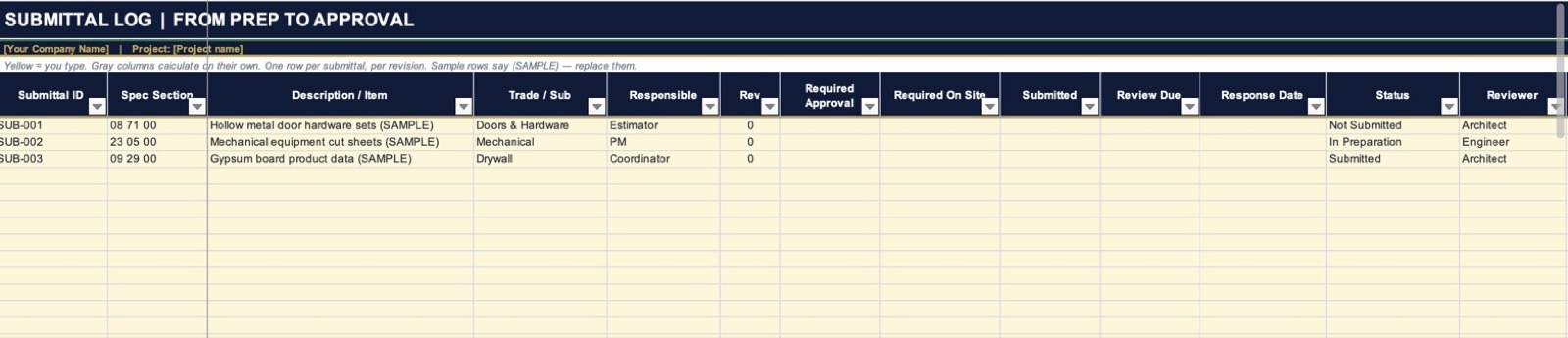
Free Construction Submittal Log Template
Track every submittal’s dates, status and reviewer, with automatic overdue flags.
Get the free templateNeed a little more help?
Start with a $197 strategy session. If you hire us for a project within 30 days, the $197 comes off the price.